
MONOPOLY GO!Chat
ScopelyCommunication
4.5725.00 Reviews
- Version
- 0.11.0
- Installs
- 1.00M
- Age Rating
- Everyone
Screenshots
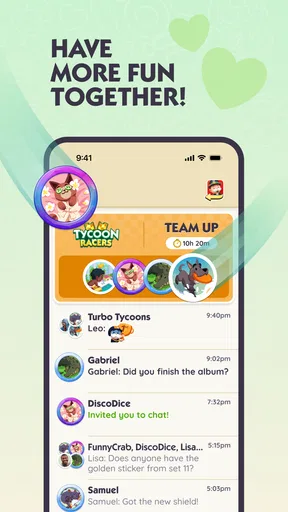
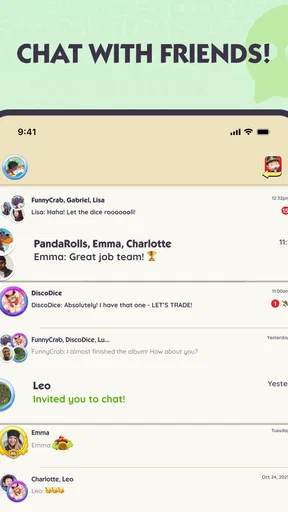
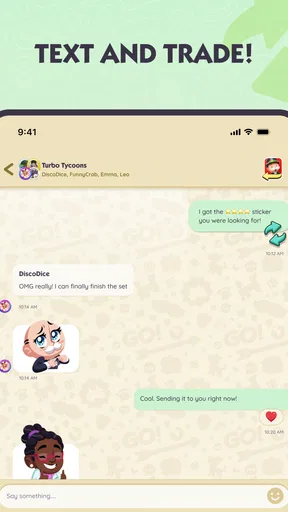
Our Review of MONOPOLY GO!Chat
 Analysis by Appyee
I installed MONOPOLY GO!Chat expecting a simple companion for players of MONOPOLY GO!, and that is exactly where it makes the most sense: keeping conversations with friends and teammates close to the game. It is a free communication app from Scopely, aimed at people who already play together and want one place for coordination, encouragement, and quick updates.
My overall impression is positive, but quite focused. This is not the kind of messenger I would choose to replace every conversation on my phone. Its value depends on whether your MONOPOLY GO! group is active and whether keeping game-related chat separate from ordinary messages would make your routine easier. If your friends are already in the same game, the dedicated setting can feel convenient. If they are not, the reason to install it becomes much weaker.
What to consider before moving your game chat
The first decision is whether you need a general-purpose messenger or a space built around one game. Apps such as regular text messaging, group chat platforms, and voice-chat services are usually better when your conversations cover work, family, several games, files, calls, and unrelated plans. MONOPOLY GO!Chat has a narrower job, and that narrowness is both its most useful quality and its biggest limitation.
I would judge it on four practical questions. Are the people you play with willing to use it? Will a separate chat reduce the clutter in your main messaging app? Do you need only short coordination rather than a broad communication toolkit? And are you comfortable installing a dedicated app for a single gaming community? A “yes” to most of those questions points toward a worthwhile trial.
The app is listed in the Communication category, carries an Everyone age rating, and is free to install. That makes it approachable for mixed-age groups and removes the usual purchase decision at the starting line. Still, free does not automatically mean frictionless: the real cost is asking your friends and teammates to adopt another place for messages.
Its current version is 0.9.0, and it requires Android 7.0 or later. On a compatible Android phone, that requirement is not especially demanding, but it is still worth checking before recommending it to someone using an older device. I would also make sure the people in your group are comfortable with the same platform, because a communication tool is only useful when the whole group can reliably reach it.
The everyday situation where it makes sense
Imagine a group that plays at different times during the day. One person notices an opportunity to coordinate, another is about to start a session, and someone else wants to celebrate a good result. In a normal messaging app, those notes can disappear among family messages, work alerts, shopping lists, and unrelated group conversations. A dedicated MONOPOLY GO! space gives those updates a clear home.
That separation is more valuable than it sounds. I find that game groups often become noisy precisely because players are enthusiastic: quick questions, reminders, reactions, and small jokes arrive close together. Keeping that activity away from important personal chats makes it easier to mute or check at a chosen time without losing the context of the game.
My practical tip is to agree on what belongs in the group before everyone starts using it. Keep urgent coordination short, put general banter in the same place, and avoid duplicating every message in another messenger. The benefit comes from reducing scattered conversations, not from creating one more inbox that has to be monitored constantly.
Where the dedicated approach is strongest
The clearest advantage is focus. When I open a general messenger, I may have to search through several conversations to find the game group. A dedicated app creates a mental shortcut: I open it because I want to talk about MONOPOLY GO!, not because I am checking every part of my social life.
That focus can help casual players as well as committed teams. A casual group can use it for occasional check-ins without mixing them with personal conversations. A more active group can treat it as a shared noticeboard for plans and reactions. In both cases, the app’s identity makes the purpose obvious to everyone who joins.
Another strength is social continuity. For players who already recognize one another through MONOPOLY GO!, the communication space is connected to an existing shared interest rather than being an empty new group. That gives the app a better starting point than a generic chat room created without a clear reason.
Scopely’s involvement also gives the app a direct connection to the MONOPOLY GO! ecosystem. I would not confuse that with a guarantee that every player will prefer it, but it does make the product feel more intentional than using an unrelated chat service for the same group. The app is built around the relationship between teammates, friends, and the game they share.
Useful habits that make the app less frustrating
The first habit I recommend is separating coordination from conversation. If your group uses every message for both purposes, important notes can vanish quickly. A short opening such as “playing now” or “checking in later” is easier to notice than a long paragraph buried in jokes. This is a small change, but it makes a dedicated game chat feel more efficient.
The second is to avoid treating the app as a replacement for every form of teamwork. For longer planning, detailed explanations, or anything unrelated to MONOPOLY GO!, a broader communication tool may be more comfortable. Keeping the dedicated space narrow protects its usefulness. The moment it becomes a second general social network, its main advantage over existing alternatives becomes harder to see.
The third is to establish a notification routine. I would not leave every gaming conversation competing with personal alerts if the group is especially active. Checking at natural breaks, or silencing the app when concentrating on work or sleep, helps preserve the convenience of a separate channel. The best setup is one that lets you return to the game conversation without feeling that the conversation controls your day.
A final tip is to test it with the smallest useful group first. Invite the friends or teammates who actually communicate, rather than moving everyone at once. If the group finds that messages are easier to follow there, adoption can grow naturally. If nobody checks it, you have learned that the problem was not the location of the chat but the group’s communication habits.
How it compares with familiar communication choices
Compared with ordinary text messaging, MONOPOLY GO!Chat offers a clearer boundary around game talk. Text messages are often easier for reaching people who do not want another app, and they may be the better choice for a one-off note or a mixed group. The dedicated app becomes more appealing when the same players exchange game-related messages repeatedly and want those conversations kept apart from personal threads.
Compared with broad group-chat platforms, its advantage is simplicity of purpose rather than a larger toolbox. General services can be better for communities that need several rooms, conversations about multiple games, voice interaction, or a mixture of gaming and everyday topics. I would choose one of those alternatives for a large, varied community. I would choose this app for a smaller MONOPOLY GO!-centered circle that values a direct connection to the game.
Compared with in-game communication, a separate app can be useful when players want their conversation to have its own place rather than being tied to a particular play session. That said, adding a separate communication step can also slow things down. If your group only needs occasional coordination, staying with whatever communication method everyone already uses may be more practical.
This is the central trade-off: the app wins through relevance, not breadth. It does not need to outperform every messenger at every task. It only needs to make MONOPOLY GO! conversations easier for a group that is willing to gather there. For everyone else, its specialization may feel like an unnecessary extra layer.
Who should install it, and who should skip it?
I would recommend trying it if you play MONOPOLY GO! with friends or teammates on a regular basis, especially when your current group chat is crowded with unrelated messages. It is also a reasonable choice for players who enjoy keeping gaming contacts separate from family, school, or work conversations. The Everyone rating makes it suitable for a broad audience, although every group should still set its own standards for respectful communication.
I would be more cautious if you are a solo player, if your friends are not interested in installing another app, or if your group already has an organized communication channel that everyone checks. In those situations, the switching effort may outweigh the benefit. A dedicated app cannot solve a participation problem: an empty chat remains empty no matter how well it is designed.
I would also skip it if you want one application for all your gaming communities. Its identity is tightly tied to MONOPOLY GO!, so a general platform will probably serve you better when your attention moves between different games or groups. Likewise, people who mainly need calls, large community management, or conversations unrelated to the game should begin with an alternative built for those broader needs.
The real cost of switching
Because the app is free, the financial barrier is low. The more important cost is behavioral. You have to install it, find the right people, explain why the group is moving, and remember to check another communication channel. That can be worthwhile for an active team, but it is excessive for a group that sends only a message every few weeks.
There is also a social switching cost. Some friends may prefer the messenger they already use, while others may not want game conversations separated from everything else. I would avoid presenting the move as mandatory. A short trial with the most active players is a fairer test, and it gives the group evidence based on real use rather than assumptions.
Before switching fully, I would keep the old group available for a short transition and clearly state where new game messages should go. Once everyone has adjusted, duplicate posting should stop. Sending the same update in multiple places feels safe at first, but it quickly recreates the clutter the dedicated app was meant to remove.
The app has already attracted over a million installs, with an average rating of 4.5 from around four thousand ratings and more than five hundred written reviews. Those figures suggest meaningful interest and generally favorable reception, but they should not replace your own group test. Communication apps are unusually dependent on who uses them with you, so personal fit matters more than popularity alone.
What the current release means for expectations
Since the current version is 0.9.0, I would approach it as a focused product that may still be developing. That does not make it a poor choice, but it does make me less likely to depend on it as the only way to reach an important group. For casual gaming conversation, trying it is low risk. For time-sensitive coordination, I would make sure everyone understands the routine and has a backup way to contact one another.
My advice is to evaluate the experience after a real week of use rather than after the first launch. Ask yourself whether messages are easier to find, whether teammates actually respond there, and whether the separate space reduces interruptions elsewhere. Those are better tests than simply deciding whether the interface looks familiar or whether the app opened quickly on day one.
My recommendation
MONOPOLY GO!Chat is a sensible recommendation for an existing group of MONOPOLY GO! players who want a dedicated communication lane. I like its clear purpose, its free entry point, and the way it can keep game chatter from overwhelming ordinary conversations. The strongest use case is not “everyone needs this”; it is “this particular team already talks often and needs a cleaner place to do it.”
I would not recommend installing it alone and expecting the app to create a community around you. Invite the people you actually play with, define the kind of messages that belong there, and see whether the group naturally returns. If they do, the focused setting can be genuinely convenient. If they do not, going back to an established messenger is the more efficient decision.
For Android users, the app supports Android 7.0 and later, and its Everyone rating makes it broadly accessible. Scopely has positioned it as a communication companion for MONOPOLY GO!, and in my experience that narrow purpose is exactly how it should be judged. Install it when your game group needs a dedicated home; skip it when your existing messenger already does that job without effort.
Privacy and Permissions
See what permissions an app requests and how it handles your data.
- Photos/Media/Files
- read the contents of your USB storage, modify or delete the contents of your USB storage
- Storage
- read the contents of your USB storage, modify or delete the contents of your USB storage
- Wi-Fi connection information
- view Wi-Fi connections
- Other
- view network connections, full network access, run at startup, draw over other apps, control vibration, prevent device from sleeping, Google Play license check
Verdict
Strengths of MONOPOLY GO!Chat
- Quick, casual matches that fit well into short play sessions.
- Bright board design and polished animations make gameplay feel lively.
- Frequent events add variety beyond the standard property-buying loop.
- Sticker collections give completion-focused players an extra objective.
- Cross-device progress is convenient when linked to a supported account.
Limitations of MONOPOLY GO!Chat
- Progress can feel slow without waiting for dice rolls or using extra resources.
- Random dice results may limit how much control you have over each turn.
- Some rewards and features are tied to limited-time events and deadlines.
- The large number of pop-ups can make the menus feel cluttered.
- It may use considerable battery and mobile data during longer sessions.
Other Releases by Scopely
View All
Stumble Guys
Action4.7

MONOPOLY GO!
Board4.6

WWE Champions: Wrestling RPG
Role Playing4.4

MARVEL Strike Force: Squad RPG
Role Playing4.3
Similar Picks in This Category
View All
Google Messages
Google LLC4.6

Gmail
Google LLC4.1

Google Meet
Google LLC4.4

Google Chrome
Google LLC4.1

WhatsApp Messenger
WhatsApp LLC4.6

Carrier Services
Google LLC4.2
Frequently Asked Questions
What is MONOPOLY GO! Chat, and how does it work?
MONOPOLY GO! Chat is the social communication feature associated with the MONOPOLY GO! mobile game, allowing players to interact with friends, teammates, and sometimes other members of their gaming community. Depending on the version and account setup, chat may be available through in-game events, group features, or connected social spaces. It is mainly designed for coordinating gameplay, sharing reactions, and staying connected while playing.
Do I need to install MONOPOLY GO! Chat separately from MONOPOLY GO!?
In most cases, chatting is integrated into the MONOPOLY GO! experience rather than being a completely independent game. Availability can depend on the current app version, region, platform, age settings, and account features. Before downloading anything described as MONOPOLY GO! Chat, users should verify that it is an official Scopely product through the Google Play Store or Apple App Store, since unofficial apps or misleading listings may not provide genuine access.
Is MONOPOLY GO! Chat safe for children and younger players?
Parents should review the chat experience before allowing younger players to use it. Social features can involve messages or interactions with other users, and the level of moderation may vary by feature and region. Use the game’s privacy, parental-control, blocking, and reporting tools where available, and avoid sharing names, addresses, school details, passwords, payment information, or other personal data. Children should also be encouraged to report uncomfortable behavior.
Can I use MONOPOLY GO! Chat without spending money?
Chat and basic social communication may generally be available without purchasing in-game currency, but MONOPOLY GO! itself includes optional purchases and progression systems. Some social activities can be connected to events, stickers, rewards, or limited-time gameplay, which may encourage continued play or spending. Review the app’s purchase settings carefully, especially on shared devices, and remember that communication access does not guarantee free access to every game feature or reward.
What should I do if chat messages are missing, unavailable, or inappropriate?
If chat does not appear, first update MONOPOLY GO!, confirm that you are signed into the correct account, check your internet connection, and review privacy or age-related settings. Features can also be temporarily changed or restricted by region and account status. For inappropriate messages, use the available block or report options and avoid responding to suspicious users. If the problem continues, contact official Scopely support rather than downloading third-party chat tools.
